Thin lens equation calculator
How it works?
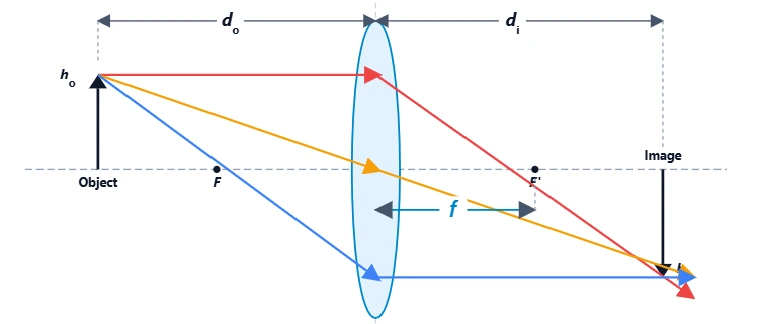
This calculator determines where an image forms using the fundamental Gaussian lens formula. It relates the focal length of the lens to the distances of the object and the image:
Where:
- f : Focal Length (Positive for convex, Negative for concave).
- dₒ : Object Distance (Distance from lens to object).
- dᵢ : Image Distance (Where the image forms).
- M : Magnification (Ratio of Image Size to Object Size).
Quick Reference
- +dᵢ = Real Image (Forms on the other side, can be projected).
- -dᵢ = Virtual Image (Forms on same side, visible only through lens).
- M > 1 = Magnified (Larger than object).
- M < 1 = Reduced (Smaller than object).
- Negative M = Inverted (Upside down).
Why use a Thin Lens Calculator?
In optical engineering and photography, simply knowing the focal length ($f$) isn't enough. You need to know exactly where the image forms ($d_i$) and how big it will be ($M$). Whether you are setting up a machine vision camera, aligning a laser focusing lens, or just solving a physics problem, precise calculations save hours of trial and error on the optical bench.
Sign Convention Cheat Sheet
In optics, a single negative sign changes the physical meaning entirely. Use this table to interpret your results correctly.
| Variable | Positive (+) Meaning | Negative (-) Meaning |
|---|---|---|
| Focal Length (f) | Converging (Convex) Lens | Diverging (Concave) Lens |
| Image Distance (dᵢ) | Real Image (Projectable) | Virtual Image (In lens) |
| Magnification (M) | Upright Image | Inverted Image |
| Object Dist (dₒ) | Real Object (Standard) | Virtual Object (Complex) |
Real-World Engineering Applications
1. Machine Vision Setup
When inspecting parts on a conveyor belt, you have a fixed "Working Distance" (Object Distance). This calculator tells you exactly how far the sensor needs to be from the lens to get a sharp image, allowing you to design the mechanical housing before you even buy the camera.
2. Macro Photography
To take a macro shot of an insect, the lens moves very far from the sensor (large Image Distance). This calculator helps you determine the specific extension tube length (spacer) needed to achieve 1:1 or 2:1 magnification.
3. Laser Beam Focusing
Focusing a collimated laser beam to a tight spot requires understanding the image plane. If the input beam isn't perfectly collimated (finite Object Distance), the focal point shifts. This tool predicts that shift so you can place your target material accurately.
4. Telescope Eyepieces
Eyepieces act as magnifiers. By placing the "object" (the telescope's primary image) inside the focal length of the eyepiece, you create a massive Virtual Image. This calculator solves the Virtual Image distance ($d_i$ is negative) which your eye then focuses on.